Can Neat Download Manager Download YouTube Videos? 7 Checks
Neat Download Manager is not a universal YouTube downloader. It may receive a video or audio link only when the browser exposes a compatible, permitted resource and the media is not protected or encrypted. Many YouTube playback requests are adaptive, temporary, account-bound, or otherwise unsuitable for a normal download manager.
Start with permission, not with capture tricks. YouTube's terms limit downloading unless the service expressly authorizes it or the rights holder gives permission. If a download is allowed, the checks below help separate a normal NDM setup problem from a source-link limitation without promising that every video can be saved.
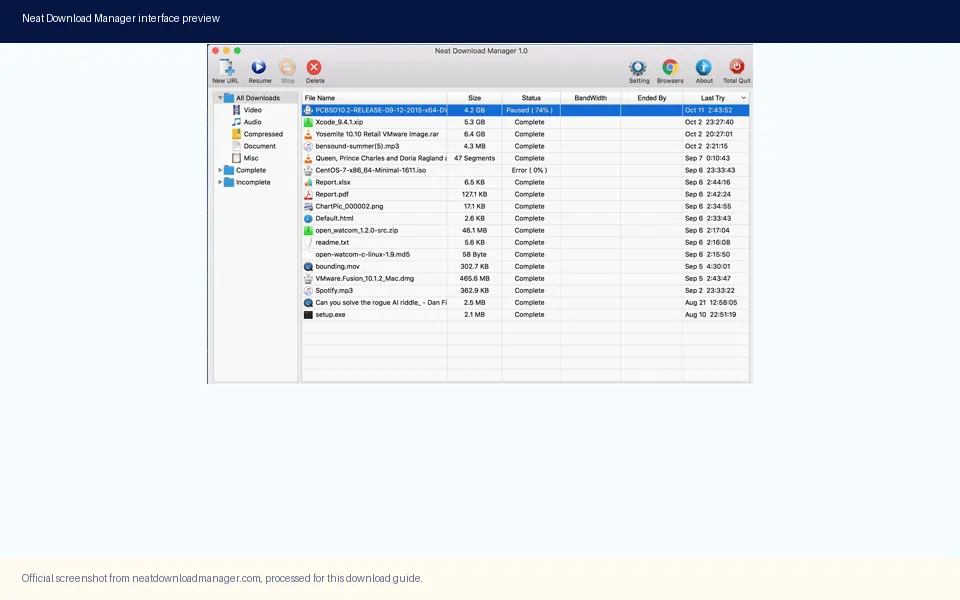
NDM is a desktop download manager for Windows and macOS. This processed official screenshot shows the real application; it does not prove that a particular YouTube video is downloadable.
Can NDM Download a YouTube Video? The Practical Answer
A download manager needs a resource it can request as a file or supported stream. A browser tab playing a video is not automatically such a resource. YouTube may deliver separate audio and video tracks, short-lived URLs, adaptive segments, signed requests, or protected media. The NDM extension can hand a compatible link to the desktop app, but it cannot turn every playback session into a stable file URL.
The right answer is therefore conditional. NDM may work with media that you are authorized to download and that the site exposes in a compatible form. It may fail, capture only one track, receive an expired address, or do nothing when the source depends on encryption, an account session, or a playback protocol the app cannot use. A failed capture does not by itself mean the extension or desktop app is broken.
What the Official NDM Sources Actually Confirm
The official Neat Download Manager page describes a desktop manager for Windows and macOS. It says NDM can download all .ts files from an HLS video and merge the segments into one .ts file. That is a specific capability, not a promise about every video service. HLS works only when the playlist and segments are accessible in a form NDM can request.
The Firefox Add-ons listing is equally useful because it defines the extension's boundary. Its public description says the extension sends links to the installed desktop app and helps download video or audio from many websites, but it also says encrypted media cannot be downloaded. The current Firefox listing reports version 1.9.9, last updated February 2, 2023. Neither source claims universal YouTube support or permission to bypass a site's restrictions.
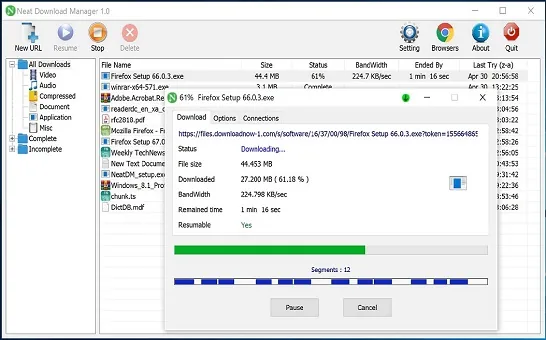
A healthy NDM transfer has a usable source URL, file size, progress, and pause controls. YouTube playback may not expose the same kind of stable resource.
Seven Checks Before You Try a YouTube Link
Use these checks in order. They prevent repeated reinstallations when the real issue is permission or source compatibility, and they give you a reproducible way to verify the NDM desktop and browser handoff with a harmless direct file first.
Confirm that downloading is expressly allowed by YouTube or by the rights holder. Do not treat technical access as permission.
Install the official Windows or macOS NDM desktop app before adding the browser extension. The extension is a handoff component, not a standalone downloader.
Open NDM and test one ordinary direct file that you are allowed to save. Verify the file name, destination, progress, pause, and resume controls.
Enable the matching Chrome, Firefox, or Edge extension and repeat the direct-file test from the browser. This isolates the browser-to-app connection.
Check whether the permitted media uses one stable file, an accessible HLS playlist, separate adaptive tracks, or encryption. Only the first two are plausible NDM inputs.
If NDM receives a URL but fails later, check whether it expired, requires a login cookie, returns an error, or omits either audio or video. Do not keep retrying a temporary address as if it were permanent.
When the source offers an official Download or offline button, use that supported path. It preserves account rules, licensing, quality choices, subtitles, and expiry behavior.
Direct File vs HLS vs Adaptive or Encrypted Playback
The delivery method explains more than the file extension shown in a page script. A direct file is the easiest case because one address maps to one resource. HLS can still be manageable when its playlist and .ts segments are openly accessible. Adaptive playback is harder because audio and video may arrive separately at changing qualities, while encrypted playback is outside the extension's documented capability.
Delivery type
What NDM may receive
Likely result
Best next step
Permitted direct file
One stable HTTP or HTTPS URL
Normal download may work
Test in NDM and verify the source
Accessible HLS
Playlist plus .ts segments
Segments may download and merge
Allow the merge stage to finish
Adaptive playback
Separate audio/video tracks or temporary URLs
Incomplete or failed capture
Use the service's supported download path
Encrypted or protected media
No reusable clear-media URL
Not supported by the extension description
Do not attempt to bypass protection
Account-bound offline mode
Content stored for in-app playback
Not a normal file export
Use YouTube's official offline feature
Why YouTube Capture Can Fail Even When the Extension Works
A successful direct-file test proves that NDM and the extension can communicate. It does not prove that a YouTube playback request is compatible. The page may create signed URLs that expire, require session headers, switch between qualities, or request audio and video separately. Browser playback can continue because the browser understands the session, while an external request no longer has the same context.
Do not respond by installing unofficial extensions, copying unknown scripts, disabling browser security, or pasting account cookies into a third-party site. Those actions increase privacy and account risk without resolving the underlying rights or protocol boundary. Use the extension troubleshooting guide for the desktop handoff, then stop when a protected or unsupported source is the actual limitation.
What HLS Segments and the Merge Stage Mean
When NDM does receive an accessible HLS stream, the transfer can look different from a normal file. The application downloads many small .ts segments and then combines them. Progress may reach the end of the network transfer before the final playable file appears because disk writing and merging still need time.
A slow merge is not automatically a YouTube problem. Available disk space, output-folder permissions, antivirus scanning, a missing segment, or an interrupted source can delay or break the final step. The dedicated merge guide explains those checks. If the stream is encrypted or the playlist is not reusable, waiting longer will not convert it into a supported download.
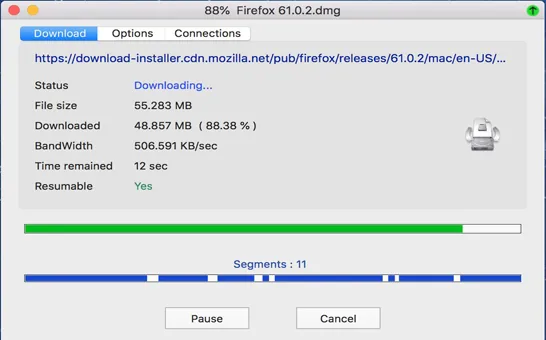
Official NDM media shows how an accessible file can be split into segments. Segment support does not override encryption, permissions, or a service's access rules.
A Safe Troubleshooting Workflow for Permitted Media
Start with the simplest known-good case and change one variable at a time. Open the desktop app, test a direct file, test browser handoff, and only then test the permitted media source. Record whether NDM receives a URL, whether it detects a size, whether progress begins, and whether audio and video are both present. This sequence identifies the failing boundary without relying on guesswork.
If no browser link reaches NDM, inspect the extension state, browser permissions, and desktop app registration. If only one website fails, compare it with the successful direct-file test; the source is more likely the boundary. If every site fails, use the extension-not-working guide. Reinstall only after the official app and extension state have been checked, because reinstalling cannot make encrypted media compatible.
Use only content you own, public-domain material, or media you have explicit permission to download.
Keep the official NDM desktop app open during the browser handoff test.
Avoid mirror installers and extensions that claim to unlock every site.
Never share account cookies, session tokens, or private media URLs with a third-party converter.
Delete failed partial files when they contain no usable media and retest with a known direct file.
Version Freshness Check for This Download Guide
This project was treated as a software-download site before the page was written. On July 29, 2026, the first-party Windows URL returned HTTP 206 for NeatDM_setup.exe with a total size of 917,340 bytes; the official page identifies Windows version 1.4. The macOS URL returned HTTP 206 for NeatDMInstaller.dmg with a total size of 1,468,544 bytes; the official page identifies macOS version 1.3. These stable first-party URLs already power the site's desktop download CTAs.
No newer desktop version was found, so existing version numbers, file sizes, system requirements, metadata, and download destinations did not need to change. The Firefox Add-ons API reports extension version 1.9.9 and a public 43,709-byte XPI, last updated February 2, 2023. This YouTube guide has no download CTA because it explains compatibility and permitted options rather than distributing media or an installer.
YouTube FAQ
Neat Download Manager YouTube FAQ
Can Neat Download Manager download every YouTube video?
No. NDM needs a permitted, compatible resource. Adaptive, temporary, account-bound, encrypted, or protected playback may not produce a reusable file URL.
Why does NDM detect video but not audio?
Adaptive playback can deliver audio and video as separate tracks. Receiving one request does not mean NDM can combine the complete presentation.
Does the NDM extension bypass encrypted media?
No. The public Firefox Add-ons description explicitly says encrypted media files cannot be downloaded.
Why does NDM merge files after a video download?
Accessible HLS video may arrive as many .ts segments. NDM can download the parts and merge them after the network transfer finishes.
Should I reinstall NDM when YouTube capture fails?
Not first. Test a normal direct file and browser handoff. If those work, the YouTube delivery method or permission boundary is more likely than a broken installation.
What is the safest way to save a YouTube video offline?
Use YouTube's Download or offline option when it is available for your account and video, or obtain an authorized direct file from the rights holder.