Neat Download Manager GitHub: Is There an Official Repository?
No official developer-owned Neat Download Manager GitHub repository was verified in the first-party sources checked for this guide. If a GitHub result uses the NDM name, treat it as a separate community project until its owner, release trail, and relationship to the official product are clearly documented.
The practical route is simple: use the official Neat Download Manager website for Windows and macOS installers, use browser-store listings for extensions, and use GitHub only as source evidence unless the official developer links to a repository.
Editorial explanatory diagram, not a real GitHub or Neat Download Manager screenshot. Verify the source, owner, and file as separate facts.
This guide records source and file facts checked on August 15, 2026.
The Short Answer: Is There an Official Neat Download Manager GitHub?
The safest answer is no official repository was verified in the sources checked for this page. The official Neat Download Manager website publishes the desktop product, direct Windows and macOS installers, browser-extension guidance, and platform information. It does not provide a clear developer-owned GitHub repository link in the checked product path. That means a GitHub search result cannot be promoted to an official download source just because its repository name contains NeatDownloadManager.
This is a provenance question, not a claim that every repository with a similar name is malicious. A third-party project may be useful, translated, modified, or independently maintained. It may also be stale, incomplete, or unrelated to the developer. The useful boundary is to describe what the repository proves about itself: owner, commits, tags, release assets, license, and supported platform. Then describe separately what it does not prove: official ownership, developer support, unmodified binaries, or compatibility with the desktop product.
If you searched for neat download manager github because you want the installer, go back to the official website instead of downloading a random ZIP, EXE, DMG, or script from a repository. If you searched because you want source code or an extension modification, read the repository as a community project and confirm its owner before running anything. The page below keeps those two needs separate so a source-code search does not accidentally become an unsafe download.
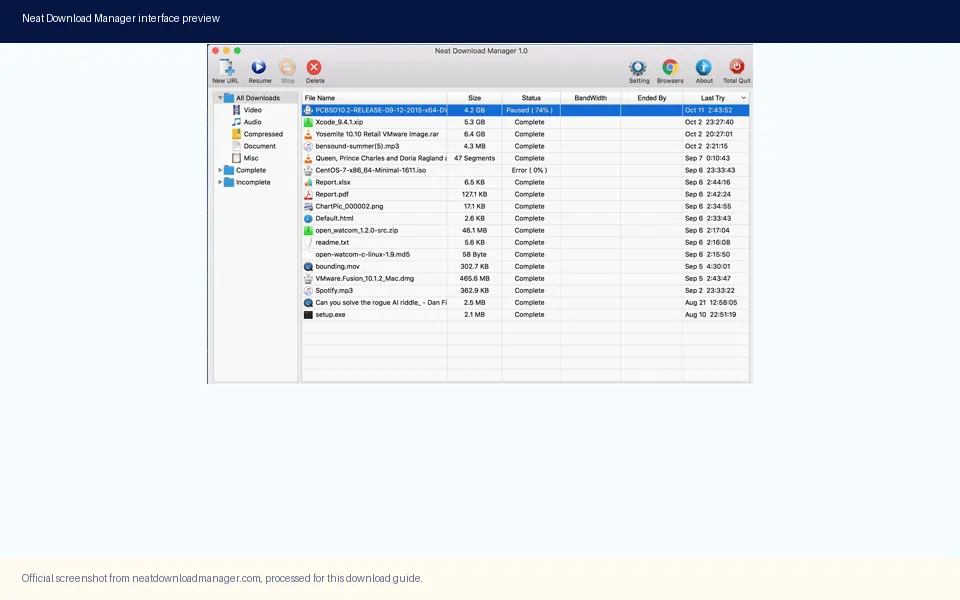
Official product interface media. It confirms what the desktop application looks like, but it is not evidence that a GitHub repository is developer-owned.
What the Official Neat Download Manager Sources Publish
The official product page is the right starting point because it connects the product name to the desktop platform list and installer path. During the August 15, 2026 check, the page exposed Windows ver 1.4 and macOS ver 1.3. The official Windows file named NeatDM_setup.exe returned HTTP 200 with a content length of 917,340 bytes. The macOS file named NeatDMInstaller.dmg returned HTTP 200 with a content length of 1,468,544 bytes. These are source and file facts, not a promise that a future check will show the same values.
The direct files also give the download decision a stable fallback. A user who wants the application should use the official Windows or Mac page and select the platform installer there. A user who wants browser integration should use the documented Chrome, Firefox, or Edge store path and keep the desktop app installed. Neither workflow requires a GitHub download, and changing a filename or repository label does not create an official Linux, portable, Android, or source-code release.
The version check matters because GitHub pages can look newer than the official product page while describing a fork, translation, patch, or unrelated tool. A repository update date tells you that the repository changed; it does not tell you that the NDM developer approved the change. Keep the official product version, file size, and source URL tied to the official domain instead of copying release claims from an unverified repository.
Fact
Checked value
What it means
Official product page
neatdownloadmanager.com
First-party platform and installer reference.
Windows desktop
ver 1.4; 917,340 bytes
Official direct file checked with HTTP 200.
macOS desktop
ver 1.3; 1,468,544 bytes
Official direct file checked with HTTP 200.
GitHub repository
No official owner verified
Name matching alone is not a developer relationship.
This site
Independent guide
Links to sources but is not the product developer.
How to Read a Neat Download Manager GitHub Result
A GitHub result contains several identity layers that should not be collapsed into one. The account owner is the first layer. The repository name is only a label chosen by that owner. The commit history and release tags are the second layer: they show how the project evolved, but they do not certify the code. The third layer is the download asset itself. A ZIP, executable, DMG, or script attached to a release needs its own platform, publisher, and integrity checks.
For the public GitHub API search checked on August 15, 2026, three repositories matched the NeatDownloadManager name. The returned owners and descriptions were third-party projects, including an extension modification and language-related projects. No result was verified as a repository published by the official Neat Download Manager developer. That finding is narrower and more useful than saying GitHub has no NDM-related code: it says the checked search response did not establish official ownership.
The same rule applies when a page says official, original, full version, or safe. Those words are claims made by a page or repository unless they are backed by a first-party link. A repository may link to the official website, but a link in the opposite direction is stronger evidence of a supported relationship. Look for the official product page, release notes, developer account, matching store publisher, and a consistent package name before treating a GitHub project as part of the official distribution chain.
Five Checks Before You Clone or Download
If you still need to inspect a repository, use the following order. The goal is not to reject every community project. The goal is to avoid confusing an interesting repository with an official installer, and to make the risk visible before code or binaries touch your machine. A repository that cannot answer the first two questions should not be used as a download source.
Confirm the owner account and repository history. Check whether the owner is the official developer, an organization linked from the official site, or an unrelated account.
Read the README, license, supported platforms, and build instructions. A project that only promises a download but cannot explain what it changes deserves extra caution.
Inspect releases, tags, commits, and issue activity. A recent timestamp is not proof of authenticity, and an old timestamp is not proof of danger; both are context.
Separate source code from release binaries. Do not assume that an EXE, DMG, APK, CRX, or ZIP is produced by the same code you can inspect.
Compare the final file name, source URL, version, and publisher with the official website. When the official site does not link back, keep the repository classified as third-party.
Official Repository vs Community Repository
The following matrix is a practical way to classify a GitHub result. It deliberately avoids a binary safe or unsafe label because repository quality depends on ownership, code, build process, and the file you actually run. The first question is whether the official developer has established the relationship. The second is whether the specific asset is traceable to that relationship.
For example, a community translation may be useful while still being unofficial. A browser-extension modification may solve a narrow interface problem while changing permissions or behavior. A Linux repository may provide a real downloader while remaining separate from the official NDM desktop application. These distinctions let you link to a project for research without turning it into a download CTA.
Signal
Supports
Does not prove
Official website links to the repository
A first-party relationship exists
Every release asset is safe or current
Repository owner is the developer
Ownership is easier to attribute
The build is identical to the official installer
Release tag and notes exist
The project has a traceable release history
The tag was reviewed by NDM maintainers
Community README links to NDM
The author references the product
The project is an official fork or plugin
Download button works
The host serves a file
The file is authentic, unmodified, or supported
Where to Download Neat Download Manager Instead
For Windows and macOS, the official website remains the correct download path checked in this guide. Use the platform-specific page and the expected installer name. The Windows setup is NeatDM_setup.exe and the macOS package is NeatDMInstaller.dmg. The fact that these URLs returned HTTP 200 on the check date is useful evidence, but it is still good practice to recheck the official page before an installation because a direct file can change later.
If you want Chrome, Firefox, or Edge capture, use the browser store listing connected to the NDM workflow and install the desktop application first. If you want an Android or portable package, do not convert a GitHub search result into an official APK or portable build. The existing Android and portable guides explain those boundaries in more detail and link back to source checks rather than unverified files.
When a repository offers a download that looks newer, compare it with the official version facts instead of choosing the newer number automatically. A fork can add a feature, a translation can change the interface, and a repack can rename the file. None of those facts alone means the package should replace the official installer.
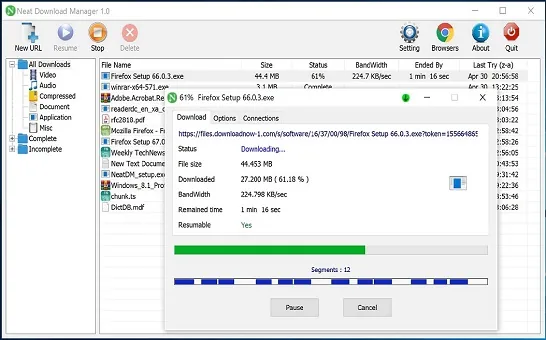
Official product screenshot showing the kind of ordinary direct-file transfer to use for a first installation test.
Windows, macOS, Linux, and Source-Code Boundaries
The official desktop platform facts checked here cover Windows and macOS. A GitHub repository can target Linux, provide a patch, or build a separate downloader, but that does not extend the official product list. The same boundary applies to portable packages and Android APK claims. If the official site does not publish the platform and does not link to the repository, describe the project as third-party instead of calling it an official version.
Source code is also not the same thing as a supported source release. A source repository may require a particular compiler, dependency set, signing process, or build environment. A release binary may include generated files or changes that are not obvious from a quick browse. If your goal is learning or contributing, follow the repository's license and build instructions. If your goal is installing NDM, return to the official installer path.
This distinction is especially important for browser extensions. An extension repository may change permissions, content-script behavior, or how download links are captured. The official Chrome, Firefox, and Edge listings are the right place to check publisher identity and permissions. A GitHub ZIP can be useful for code review, but it should not quietly become a replacement for a store listing.
Common Neat Download Manager GitHub Mistakes
The most common mistake is treating the GitHub search page as a developer directory. GitHub hosts projects from many owners, and a familiar product name can appear in a translation, workaround, fork, extension, or unrelated downloader. Search demand tells you what users type; it does not verify the publisher behind a result.
Another mistake is using a repository update date as a latest-version signal. The official site and direct files checked here still identify Windows ver 1.4 and macOS ver 1.3. A community repository updated in 2026 may be active, but that date does not make it the latest official NDM release. Record the owner and release type before comparing numbers.
Finally, do not paste account cookies, disable browser protection, or run a script simply because a README says it is required for download capture. A normal installation should have an explainable source chain. When that chain is unclear, stop and use the official page or ask the project owner for documentation.
Bottom Line for Neat Download Manager GitHub Searches
The checked evidence supports a careful conclusion: no official developer-owned Neat Download Manager GitHub repository was verified, while the official website and direct Windows/macOS files were available as the first-party download path. GitHub results should therefore be classified by owner and project type, not by the product name in the repository title.
Use the official website when you need the desktop installer, use browser stores for supported extensions, and use GitHub as a research or source-code surface only when the project relationship is clear. That approach answers the GitHub question without inventing an official repository, a direct GitHub download, or a safety scan that was never performed.
GitHub source FAQ
Neat Download Manager GitHub FAQ
Is there an official Neat Download Manager GitHub repository?
No official developer-owned repository was verified in the official product page, direct installer path, and public GitHub API search checked on August 15, 2026. Recheck the official website if the developer publishes a repository later.
Can I download Neat Download Manager from GitHub?
Use the official Neat Download Manager website for the Windows or macOS installer. A GitHub repository with a matching name is not automatically an official download source, so do not treat its ZIP, EXE, DMG, or script as the product installer without first-party ownership evidence.
Is a repository called NeatDownloadManager automatically official?
No. Check the owner, official links, release notes, license, commits, and publisher relationship. A repository name is a label, not proof that the official developer created or supports the project.
What is the official Neat Download Manager download path?
The checked first-party path is the official Neat Download Manager website. It exposed Windows ver 1.4 and macOS ver 1.3, with direct files named NeatDM_setup.exe and NeatDMInstaller.dmg on the August 15, 2026 check.
Is the gendloop NeatDM GitHub repository official?
The gendloop/NeatDM repository should be treated as a separate community project. Its owner and release history do not by themselves prove that it is published, signed, or supported by the official Neat Download Manager developer.
Does Neat Download Manager publish source code on GitHub?
No official source-code repository was verified in the checked first-party product path. If you find a source repository, classify it by owner and documentation and do not confuse a community fork or translation with an official source release.
How should I verify a Neat Download Manager GitHub result?
Confirm the owner, look for a first-party link, read the build and license instructions, inspect releases and assets, and compare the final file with the official website. If the relationship is unclear, use the official installer path instead.